Try disabling the speed limit in torque mode (controller.config.enable_current_mode_vel_limit)
I’ve created a github issue for this, please put any info you have in there. startup_closed_loop causes UNKNOWN_PHASE_ERROR · Issue #582 · odriverobotics/ODrive · GitHub
Was there any change related to pre-calibration data for the encoders?
Namely, requesting state AXIS_STATE_ENCODER_INDEX_SEARCH doesn’t actuate the motor as it did in 0.5.1. However, one can request AXIS_STATE_CLOSED_LOOP_CONTROL immediately afterwards and the drive actually goes into closed loop control - then, if the motor is disturbed in any way, MOTOR_ERROR_SYSTEM_LEVEL and ODRIVE_ERROR_DC_BUS_OVER_REGEN_CURRENT are generated…
We are also experiencing issues activating step/dir input mode
- disabled UART on pins 1,2,
- switched the pins to mode 0 (GPIO),
- enabled step_dir in axis config
- checked for correct step and direction gpio mapping in axis config
Is there anything else to check/do?
We upgraded the FW to 0.5.2 due to LPF on motor thermistors (we had an issue that in one moment odrive with 0.5.1 went into a weird state, where the stationary and unloaded motor got so hot it burned the skin on touch…).
ps: anti-cogging calibration is not operational, either… odrv0.axis0.controller.start_anticogging_calibration() sets the calib_anticogging: True, but there is absolutely no motion after initial ‘jerk’ to the starting position
Hi,
I ran a firmware update using multi-platform instructions posted on the odriverobotics site. I was running into many issue and am now trying to go back to the 0.5.1 firmware version.
I downloaded the folder from github and it is sitting in my downloads and I am not quite sure where to move the folder from there. I was wondering if anyone knew what file location it should be placed in?
Hey guys, I am using a motor with hall sensors built in and I am having getting position control working. I can get velocity control working when I am in incremental encoder mode, but when I change to hall encoder mode, I can’t get position control working.
One thing I am confused about is what’s the difference between hall encoder mode and incremental? The screenshot below says I need to put it in incremental mode, but I think I want to get it working in Hall mode.
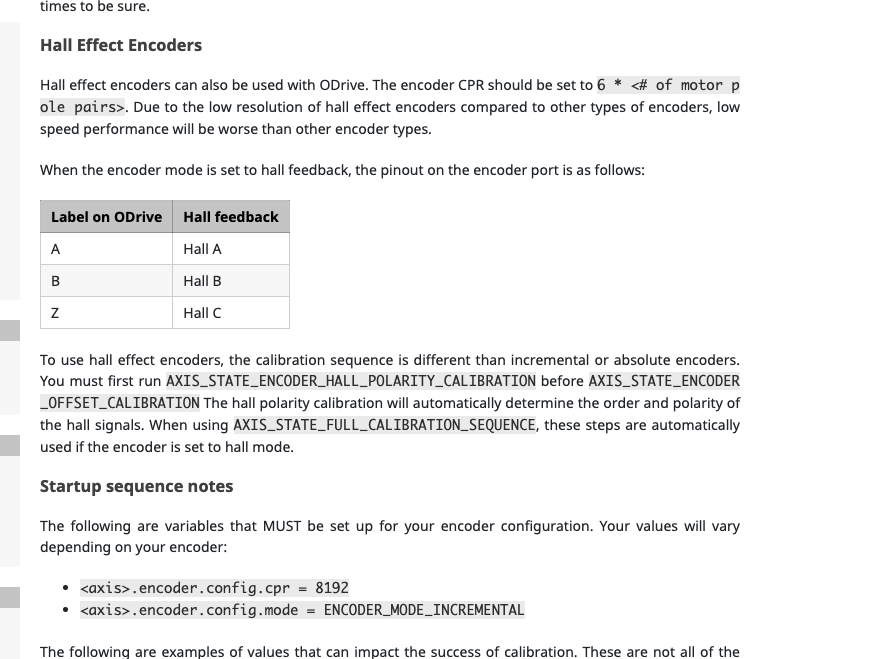
Another thing, the screenshot below says to configure GPIO pins 9,10,11 to digital, but in Odrive now, I get an error like AttributeError: Attribute gpio9_mode not found when trying to perform the commands below.
.config.gpio9_mode = GPIO_MODE_DIGITAL
.config.gpio10_mode = GPIO_MODE_DIGITAL
.config.gpio11_mode = GPIO_MODE_DIGITAL
Thanks for all the help!
@MatevzB what command sequence did you use for setup?
I tried this and it works as expected:
odrv0.erase_configuration()
odrv0.axis0.encoder.config.use_index = True
odrv0.axis0.requested_state = AXIS_STATE_MOTOR_CALIBRATION
# [wait for beep]
odrv0.axis0.requested_state = AXIS_STATE_ENCODER_INDEX_SEARCH
# [wait for motor to stop]
odrv0.axis0.encoder.index_found # returns True
odrv0.axis0.requested_state = AXIS_STATE_ENCODER_OFFSET_CALIBRATION
# [wait for motor to stop]
odrv0.axis0.encoder.config.pre_calibrated = True
odrv0.axis0.motor.config.pre_calibrated = True
odrv0.save_configuration()
# [wait for reboot]
odrv0.axis0.encoder.index_found # returns False
odrv0.axis0.requested_state = AXIS_STATE_CLOSED_LOOP_CONTROL
odrv0.axis0.current_state # returns 1 (idle)
odrv0.axis0.requested_state = AXIS_STATE_ENCODER_INDEX_SEARCH
odrv0.axis0.encoder.index_found # returns True
odrv0.axis0.requested_state = AXIS_STATE_CLOSED_LOOP_CONTROL
odrv0.axis0.current_state # returns 8 (closed loop control)
As for the anticogging and step/dir issues, I have to look into that.
@vvanamala you can point odrivetool to the path where your downloaded hex file is: odrivetool dfu /path/to/firmware.hex.
@ap23 can you post the output of odrv0.config? Does it contain an item called gpio9_mode?
@Samuel We ended up figuring this out, it turns out we didn’t need to set those GPIO pins to digital. However, now we got position control to work but are having a little trouble with tuning our system.
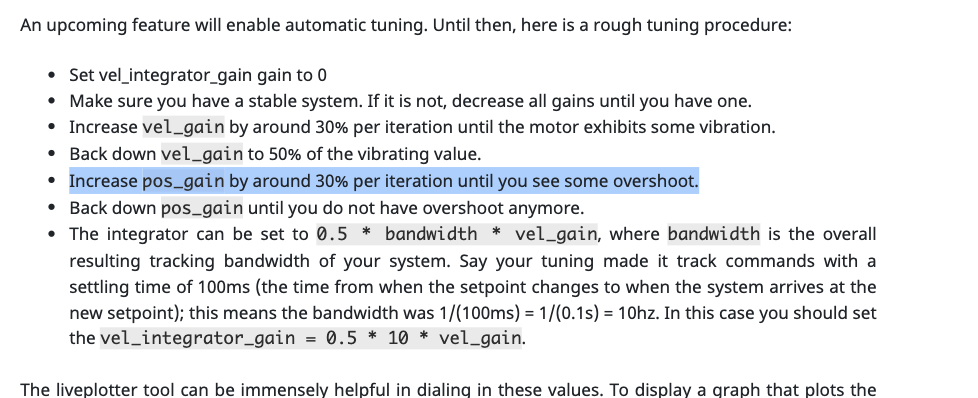
In the tuning instructions below, it says to increase position gain until it overshoots. Does this mean the. motor has to already be spinning during tuning? Do we need to give it an input position before tuning? What exactly does overshoot mean in this context? Thanks a lot! Also, I’m having an issue where sometimes i need to give the motor a small tap before it goes to the commanded position. Is there any way to fix this?
@Samuel On previous versions, one could go directly to AXIS_STATE_ENCODER_INDEX_SEARCH after the reboot with a precalibrated motor. Was this intentionally changed?
It looks like the encoder setpoint does not zero when endstop is pressed.
Settings:
odrv0.config.gpio7_mode = 0
odrv0.axis1.min_endstop.config.gpio_num = 7
odrv0.axis1.min_endstop.config.is_active_high = True
odrv0.axis1.min_endstop.config.debounce_ms = 200
odrv0.axis1.min_endstop.config.enabled = True
odrv0.axis1.min_endstop.config.offset = -3
odrv0.axis1.controller.config.homing_speed = -2
I saw some people working with the Devel branch, this seems like a lot of work to get into.
Is it possible to get a regular firmware download with this updated?
@ap23 yes the ODrive needs to be at a stage where you can command it a position setpoint and the motor will go there. For tuning the simplest way is to send manual position setpoints to send the motor back and forth between two positions. Overshoot means that the motor spins further than the commanded position and then turns back before finally coming to a halt. The tap might be required because the motor can’t overcome static friction and cogging torque. You can try to increase the current limit a bit to fix this.
@MatevzB You can still do that. In my log I only ran additional commands to verify that the ODrive rejects closed loop control as expected after startup.
@Samuel thanks a lot! One more thing, I think I tuned my motor properly as it accurately goes to inputted position with no overshoots and vibrations. This is with a vel_gain of 0.30, pos_gain of 28, and a vel_integrator_gain of 0. When I use the formula for vel_integrator_gain, i get 150, and then this makes my system vibrate.
- What should I do about this for vel_integrator_gain? Change my bandwidth? If so, to what?
Also, is there a reason why the motor isn’t, say, “fighting back” a lot when I hold it as it is spinning in velocity mode? How can I make it do this in both modes? EDIT: We just measured current and it looks like the system isn’t really increasing current after I hold it down (when vel_integrator_gain is 0). When I make vel_integrator_gain 150, it somewhat increases current upon holding the motor, but not that much. Also, when I put it in position mode with these values, it just vibrates rapidly, unless vel_integrator_gain is shifted to 0.
- current_lim: 85
- requested_current_range: 100
- velgain, posgain: 0.30 and 28
- bandwidth: 1000
- current_control_bandwidth: 2000
- How else could I make it so current increases to maintain motor velocity upon some stress to the motors?
Additionally, when I do get a current limit violation, and even sometimes when I don’t, I notice that the current_lim state is drops to 11 automatically. Any reason why?
Lastly, I’m using a 190 kv motor, but when I do 8.27/190 for my torque constant, the low value causes the motor to spin extremely fast with any input and thus cause a current_lim violation. Any thoughts about this?
Thanks a lot for your help too, appreciate it
@Samuel I tried to redirect the path as you suggested although I keep running into an issue that I had before that I’m not sure how to fix. When launching the odrive tool, the prompt states:
 C:\Users\vaish>odrivetool dfu /path/to/firmware.hex
ODrive control utility v0.5.2.post0
Waiting for ODrive...
←[91;1m13:02:26.766500700 [USB] Could not open USB device: -5←[0m
←[91;1m13:02:27.795895800 [USB] Could not open USB device: -5←[0m
←[91;1m13:02:28.825201000 [USB] Could not open USB device: -5←[0m
It should be 0.5 * vel_gain * the desired system response bandwidth of the velocity control, not the current controller. Try something between 1.5 and 15, not 150.
8.27 / 190 is correct. It spins very fast with any what input? input_pos?
So I tried to update and updating the odrivetool seems to be no problem (the picture was taken with the odrivetool downgraded again) but after running the DFU tool “successfully” the firmware number on the odrive doesn’t change to 0.5.2
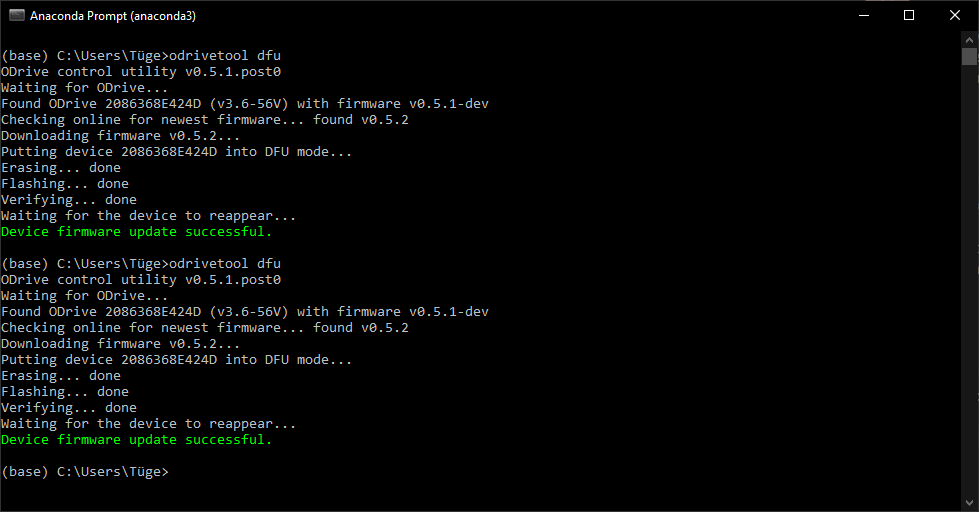
I would’t be so bothered about it if I weren’t getting errors left, right and centre (fet-transistor error, unbalanced phases, other motor errors and some system-level errors)
Does anyone know what I am doing wrong?
1 Like
@Samuel
As I wrote initially, changing the requested_state into AXIS_STATE_ENCODER_INDEX_SEARCH directly after reboot doesn’t actuate the motor and just finishes immediately. Setting the state to closed loop afterwards, actually does actuate the motor, but it is not stable (ODrive has no idea on where the rotor is…).
1 Like
Hi everyone, after being unable to drive my motor in sensorless mode i decided to upgrade the firmware of the board. it failed and now not even the USB is recognised by windows… close to brick mode…
can i please have some ideas?
@Diego_Colonnello Change the DFU on the DIP switch to 1 and reboot the card. You can then proceed either with the latest version odroid tool to load the firmware or use the STM32CubeProgrammer to load the hex directly.
I fixed mine this way.
I tried this exact sequence today with the 56V ODrive 3.6. Nothing happens when encoder is instructed for index search.
Normal calibration does work, but it is not possible to do full calibrations when the motors are mounted in the final position.
As noted, we really need the temperature sensors on the motor and the driver since one of the ODrives failed in such a way that both the motor and the driver almost got toasted. Since the noise is not filtered in the previous firmware, the temperature limits just get hit even during motor calibration of the other motor channel…
Can we expect any fix for the latest firmware since our project is standing still…
@Wetmelon I got it to work, thanks! But now I have another issue. The “f motor” UART command for ASCII which is supposed to send position data to the computer isn’t working. When I run the command, I get back non-sense characters. I’m extremely confused on what to do or how to debug this. Any thoughts? Thanks!
1 Like
Double check that you have a good ground, and make sure you’re reading Floats instead of ints or characters.