I was trying to troubleshoot my can adapter which has not worked since I bought it, I am using it with 2 Odrive S1 units. The adapter wont show up in device manager, I am extremely confused with this.
1 Like
Hi! Do the LEDs on the CAN adapter come on when you plug it in?
Yes, but no flashing
1 Like
That’s fine – that just means uninitialized. Do you have a different USB cable and/or computer to test with?
In case this is an issue with the USB connector, I’d be happy to toss another unit in the mail for you; if you wouldn’t mind, could you shoot an email to info@odriverobotics.com with your original order number and best shipping address, referencing this thread?
I did try many cables ( i test every cable, and i throw out every power-only cable) and 3 computers, I can reach out via email. Would you like me to ship the one I have back for inspection?
1 Like
The new adapter won’t connect to the odrives, it is giving errors like memory out of bounds, cannot claim port, am I doing something wrong? I am on a windows 11 laptop, I tried the USB-C port and USB-A ports. The adapter shows up in device manager, but the web gui won’t recognize it.
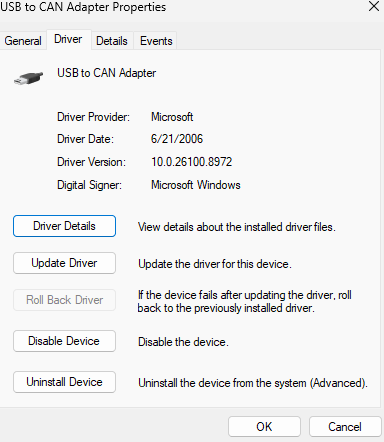
Can you show the driver that’s set in device manager? Also, would you mind collecting the data as shown here? Web GUI — ODrive Documentation 0.6.12 documentation
Sorry for the delayed response, had some family stuff, here is the files, I have the odrive powered, with the can bus plugged in with a known good cable
dashboard:1 is deprecated. Please include
dashboard:1 Error while trying to use the following icon from the Manifest: ODrive Web GUI (Download error or resource isn’t a valid image)
js_primitives.dart:28 Got object store box in database general_config.
js_primitives.dart:28 loaded existing config general_config.general_config
js_primitives.dart:28 Your analytics ID is 2a11c6aec05e9146. If you’re having issues with the ODrive GUI, share this with ODrive Robotics support if you want your support case to be associated with analytics data. This might help us pinpoint issues faster.
js_primitives.dart:28 Got object store box in database devices.
js_primitives.dart:28 loaded 2 devices from user storage
js_primitives.dart:28 Got object store box in database device_configs.
libodrive.js:3109 [0ms] [libodrive] initialized libodrive 0.9.5
js_primitives.dart:28 new DeviceStub from storage 003CF67449A9
js_primitives.dart:28 new DeviceStub from storage 003CF6744AB6
libodrive.js:3109 [4ms] [UsbInterface] starting USB discovery
js_primitives.dart:28 fetching release index…
js_primitives.dart:28 Got object store box in database user_booleans.
js_primitives.dart:28 discovered new adapter 003D00374858530731303438
js_primitives.dart:28 autoconnect: autoconnect=false, connectionLocked=false, connectingOrConnected: false
js_primitives.dart:28 _onFound finished
js_primitives.dart:28 loading controls configuration from persistent store
js_primitives.dart:28 Got object store box in database control_configurations.
js_primitives.dart:28 Got object store box in database chart_configurations.
js_primitives.dart:28 autoselecting version
js_primitives.dart:28 autoselecting version
js_helper.dart:1424 Uncaught (in promise) Error
at Object.W (js_helper.dart:1424:15)
at a3W.bxu (libodrive.dart:530:28)
at Object.bzw (js_helper.dart:1073:11)
at Object.Zh (core_patch.dart:90:23)
at b8U.$1 (types.dart:516:16)
at b7u.$5 (types.dart:484:41)
at Object.bzw (js_helper.dart:1073:11)
at Object.Zh (core_patch.dart:90:23)
at bEb (js_allow_interop_patch.dart:57:3)
at js_allow_interop_patch.dart:34:1
js_primitives.dart:28 error enumerating selected device: RuntimeError: unreachable
RuntimeError: unreachable
at 003ef762:0xcceb9
at 003ef762:0xccf21
at 003ef762:0xd19b6
at 003ef762:0xf84a
at 003ef762:0x4f1a9
at 003ef762:0x508b2
at 003ef762:0x44e88
at 003ef762:0x438d7
at 003ef762:0x45062
at 003ef762:0x41417
js_primitives.dart:28 saving device list: [{serial_number: 003CF67449A9, name: ODrive Right, user_named: true, hw_version: minified:io, fw_version: 0.6.12}, {serial_number: 003CF6744AB6, name: ODrive Left, user_named: true, hw_version: minified:io, fw_version: 0.6.12}]
js_primitives.dart:28 connect to 003D00374858530731303438 via usb
js_primitives.dart:28 error connecting to USB-CAN adapter: Exception: Could not claim interface 0 on USB device: Promise failed: InvalidStateError: Failed to execute ‘selectConfiguration’ on ‘USBDevice’: The device must be opened first.js_primitives.dart:28 Exception: Could not claim interface 0 on USB device: Promise failed: InvalidStateError: Failed to execute ‘selectConfiguration’ on ‘USBDevice’: The device must be opened first.
js_primitives.dart:28
js_primitives.dart:28 saving device list: [{serial_number: 003CF67449A9, name: ODrive Right, user_named: true, hw_version: minified:io, fw_version: 0.6.12}, {serial_number: 003CF6744AB6, name: ODrive Left, user_named: true, hw_version: minified:io, fw_version: 0.6.12}]
Thanks!
Can you try this exact sequence:
- Unplug the adapter
- Refresh the GUI page
- Plug the adapter back in
- Wait a few seconds, and it should show up in the GUI’s device list on its own. Connect from there.
Don’t go through the browser’s “pair device” popup this time, that’s only needed the very first time an adapter is used.
Let me know how that goes!
The odrives still do not show up via Can bus, even with that sequence
Im considering having an isolated USB hub and connect via usb, would that be a better idea? My goal is to have both odrives showing up on my computer at once for easy programing.
If you put both ODrives on their own isolators, that should be just fine.
That being said, CAN is still recommended – seems like some really bizarre quirk of your system though. Would you mind sharing what computer model this is?
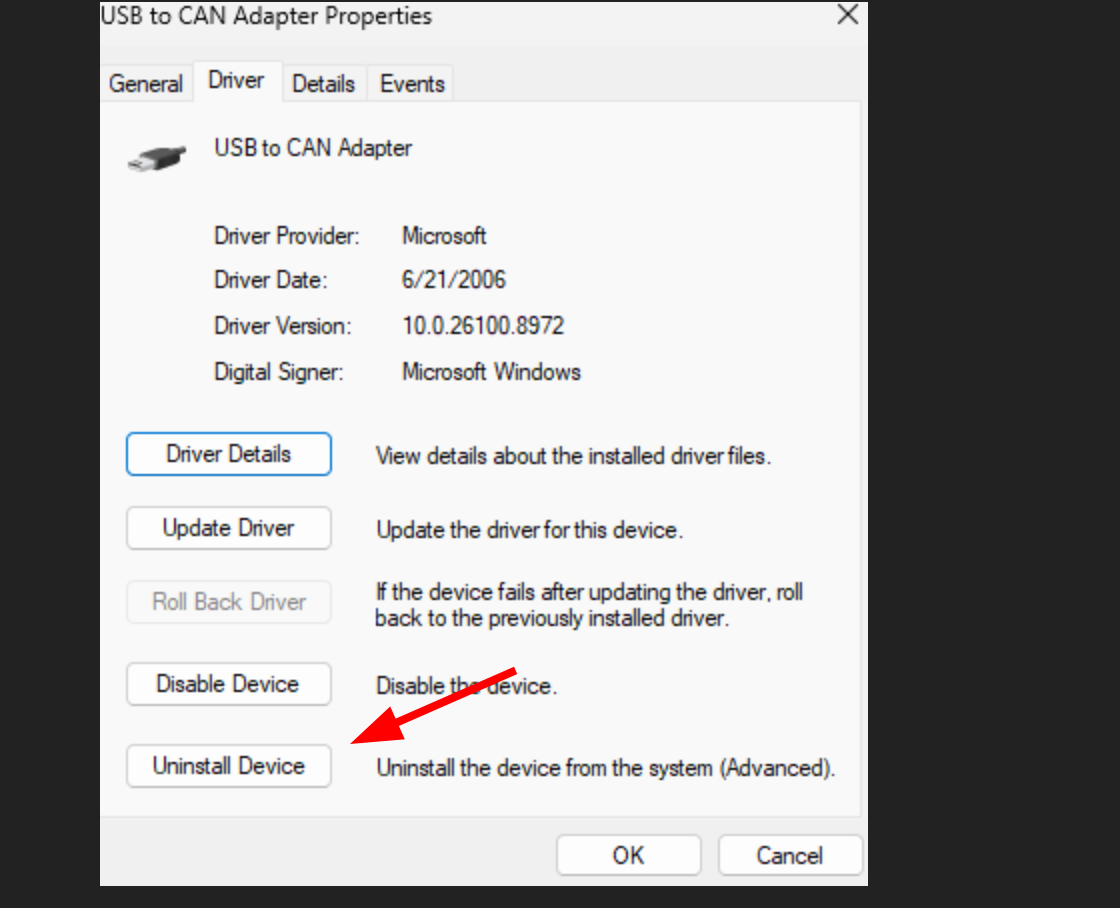
One last thing to try – in case for some reason a really weird driver got set, you could try uninstalling the driver for the USB-CAN adapter, then plugging it in again, which should force a refresh of the driver used:

It is an Acer aspire A3sp14-31pt
Processor Intel(R) Core™ i3-N305 (1.80 GHz)
Installed RAM 8.00 GB (7.68 GB usable)
Graphics card; Intel(R) UHD Graphics (128 MB)
Storage;134 GB of 238 GB used|
System type; 64-bit operating system, x64-based processor
Pen and touch; Pen and touch support with 10 touch points
Uninstalling the drivers did not help, just tried it twice.
I will try it on my desktop at home tonight, I don’t know why that would be any different, but windows…
No dice on mt desktop either, even after a firmware update via USB.