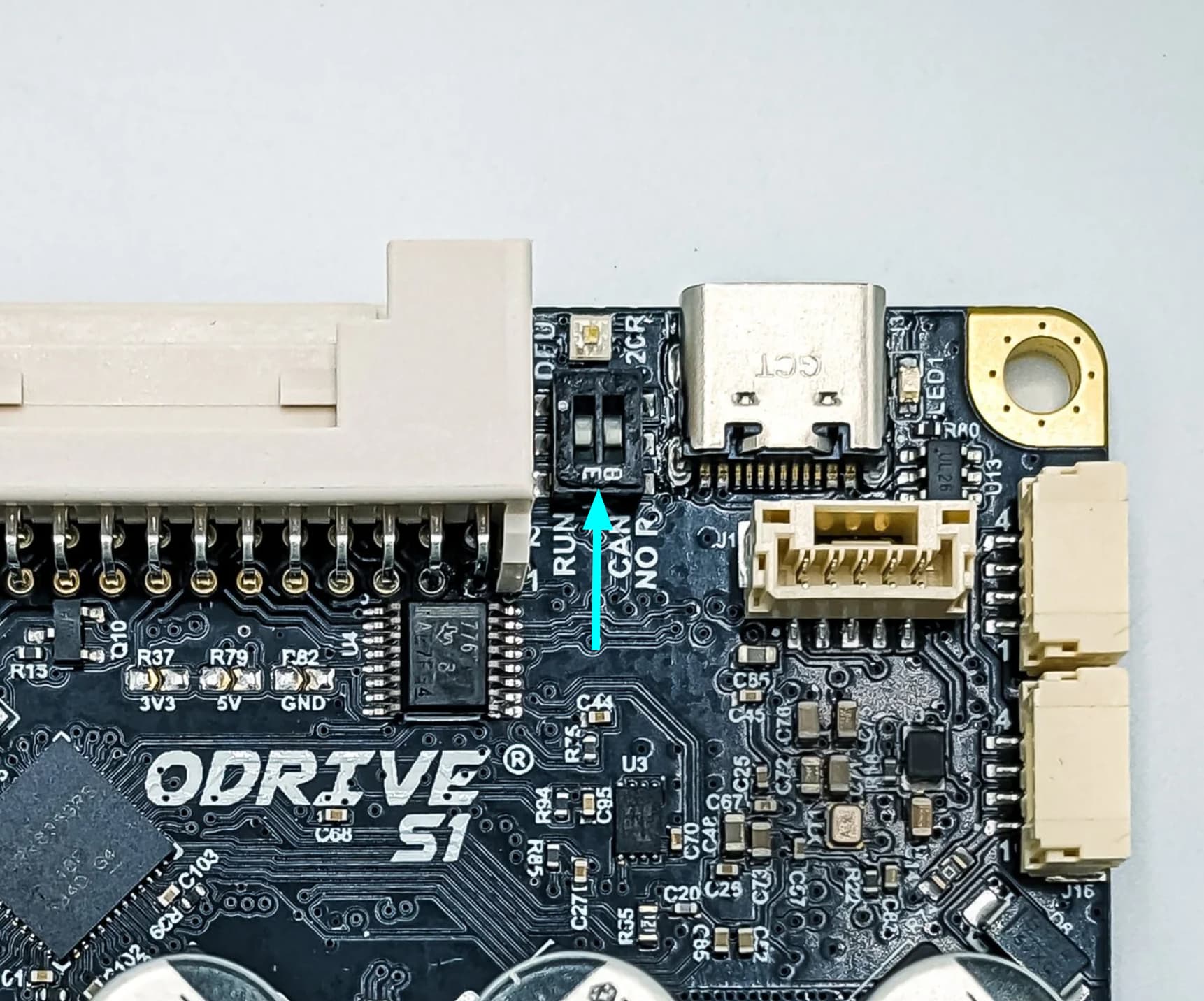
I’m trying to set up CAN communication to my ODrive S1 (latest version) from a NUCLEO-G474RE with a Seeed Studio CAN-BUS shield. The CAN communication is not working. One of the things that could be causing it is that the termination resistors are not set correctly, as in the docs, there is this section:
(CAN Bus Guide — ODrive Documentation 0.6.11 documentation)
“If your ODrive is the “last” (furthest) device on the bus, you can use the on-board 120 Ohm termination resistor by switching the DIP switch to “CAN 120R”. Otherwise, add an external resistor. The nominal bus resistance should be 60 ohms between CANH and CANL.”
Thanks, I’ll try that. I’m using the Seeed Studio CAN-BUS Shield V2.0 (CAN-BUS Shield V2 - Seeed Studio). I made sure that the SPI_B pins are used by cutting and soldering the right pads on the back. I couldn’t check if it is actually putting any messages on the bus, so I also ordered a USB-CAN adapter to check.
Are you programming this with the Arduino IDE, or bare metal / STM32Cube HAL? The G474 has a CAN peripheral, that might be easier than adding SPI support for the MCP2515 that shield uses – you’d just need a CAN transceiver.