Brushless DC motor passing calibration, then hits velocity limit

Hello,

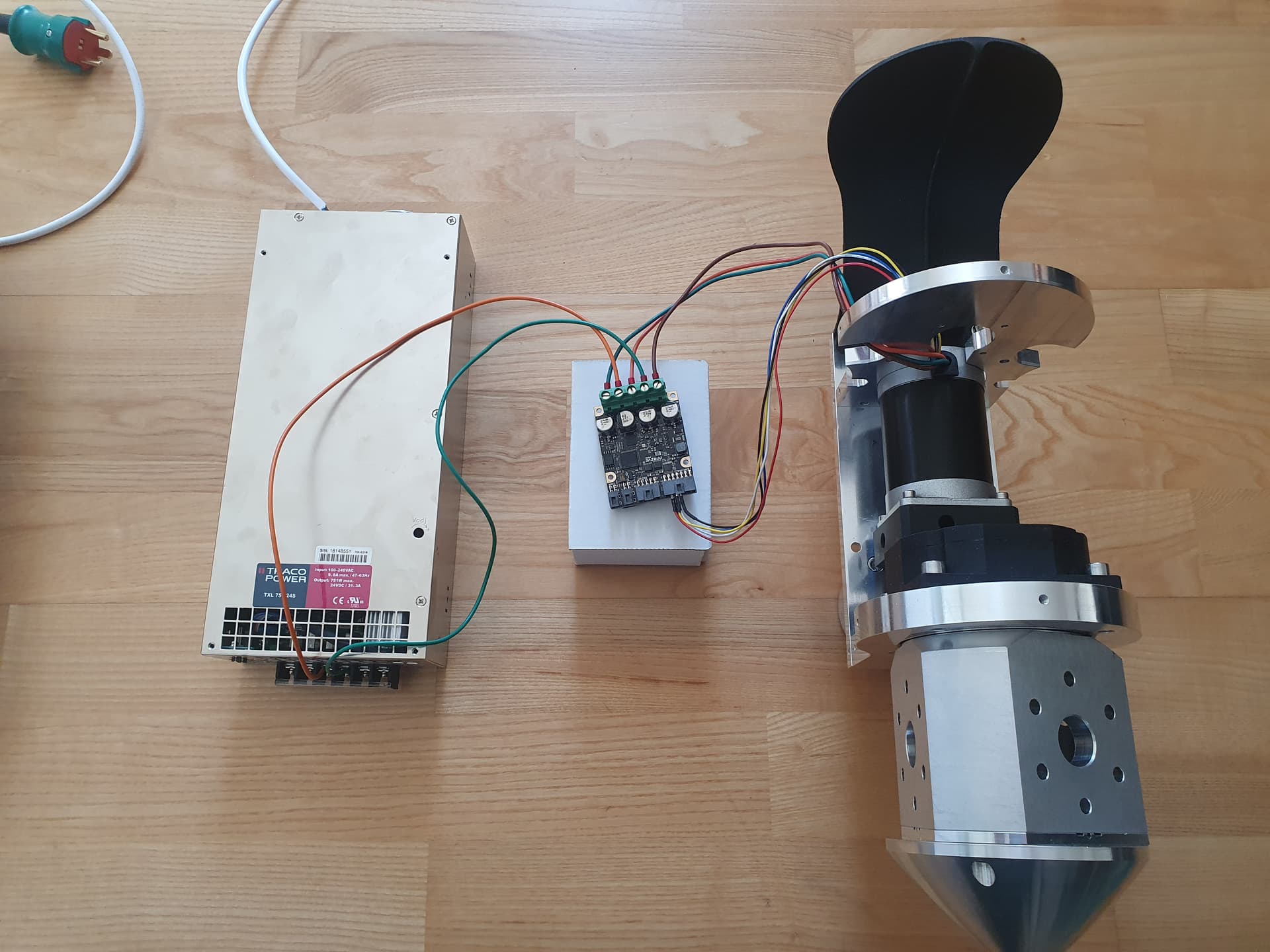
I’m working with an ODrive Pro, Traco power txl 750 24s power supply and a 57BLR90-24-01 brushless motor with hall sensors. I have attached an image of the setup.

During the calibration in the UI, the motor does not move smoothly (a bad sign) but clears the calibration. Then if I try to move it through the UI it instantly hits VELOCITY_LIMIT_VIOLATION= 32768 (0x8000) and this error persists until the board is disconnected.

If I try to setup through odrivetool in python the board crashes on the motor calibration step. I have checked my wiring against the diagrams and there are no shorts as measured with a multimeter.

How would I go from here? My objective is to make the motor spin and I have been unsuccessful.

A few issues I see here:

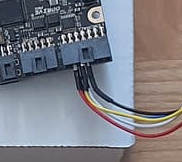
  1. This is absolutely not going to make a reliable connection, and I’m a bit suprised it managed to get past the calibration step :slight_smile:
    image
    You should likely pick up a harness build kit from our shop, or the mating receptacles/crimps/precrimped wire from Digikey/Mouser/etc.

  2. Typically, the motor needs to be unloaded during calibration. It’s a one-time procedure, so hopefully it’s not an issue to remove the motor from the gearbox/load here.

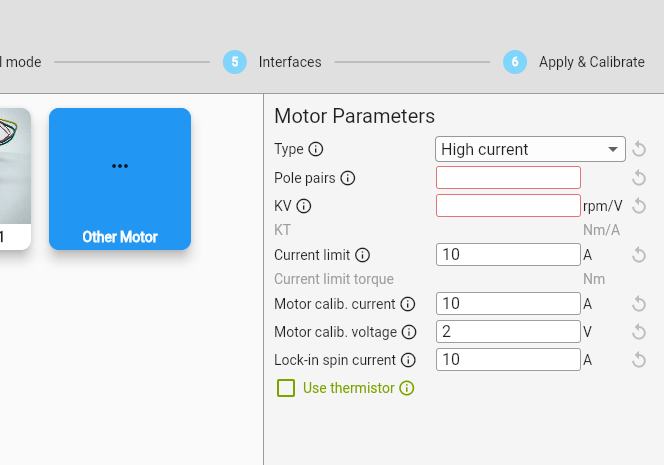
  3. You may need to modify the motor calibration parameters. Can you show what you were setting in the GUI for these parameters?
    image

  4. Halls are very low resolution, it can be difficult to get smooth control. The default controller gains are typically for higher resolution encoders. I’d recommend tuning them in the GUI dashboard tab after configuration/calibration.

Specifically, you also say

If I try to setup through odrivetool in python the board crashes on the motor calibration step.

What do you mean crashes? Do you mean the ODrive disconnects over USB, or just that it throws an error? If you run e.g. dump_errors(odrv0), what does it return?

Thank you for taking the time to answer.

  1. Yes I know its kind of a sloppy job, I did use crimped wires and isolated the ends to mitigate that fact. I will look into fitting a Molex Nano-Fit 14 onto those wires.

  2. Unloading the motor is a very valid point, it did not cross my mind to have the motor free even though the UI asks it to be. In my ignorance I assumed it would be ok, though obviously that is not what ‘calibration’ means.

  3. Since my motor is 4 poles, my pole pairs were set to 2. For KV I used KV = RPM / Voltage, so 150 ~ 3500 / 24.

  4. I did not know halls have that property. I did try tuning it through UI but no matter how small any values I set were, the moment I tried to turn the motor it threw the velocity limit, with vel itself endlessly increasing.

As for the odrivetool python crash, what I mean specifically that at the step under Motor Configuration → odrv0.axis0.requested_state = AxisState.MOTOR_CALIBRATION in a cmd window, the board becomes unresponsive. No amount of waiting resolves it, the only way to get the board to respond is to disconnect it from the power supply and PC and reconnect.

Yes I know its kind of a sloppy job, I did use crimped wires and isolated the ends to mitigate that fact. I will look into fitting a Molex Nano-Fit 14 onto those wires.

If you want to let me know your original order number, I can see about tossing a few precrimped wires and a housing in the mail for you :slight_smile:

I did not know halls have that property. I did try tuning it through UI but no matter how small any values I set were, the moment I tried to turn the motor it threw the velocity limit, with vel itself endlessly increasing.

Oh hm, what firmware version are you using? There was a bug in v0.6.10 that caused some issues with hall encoders; you should ensure you’re updated to v0.6.12.

Also, note the datasheet on those motors is wrong, as far as I can tell – they’re actually four pole pairs, not four poles / two pole pairs.

As for the odrivetool python crash, what I mean specifically that at the step under Motor Configuration → odrv0.axis0.requested_state = AxisState.MOTOR_CALIBRATION in a cmd window, the board becomes unresponsive. No amount of waiting resolves it, the only way to get the board to respond is to disconnect it from the power supply and PC and reconnect.

Interesting. Are you using a USB isolator?

Also, could I see the current configuration you’re using? You can export it with odrivetool backup-config config.json, then upload the resulting config.json here.

Thank you for the offer, I don’t have the order number as this task was passed down to me. Some other competent engineer was supposed to attend this task, but I wanted to give it a shot myself.

For the initial post, my firmware was on v0.6.11. Now I have updated to v0.6.12.

I’ve exported the odrive_config, but it is 354 lines and the website does not allow .json upload.

No I do not use an USB isolator as that was not part of the controller purchase.

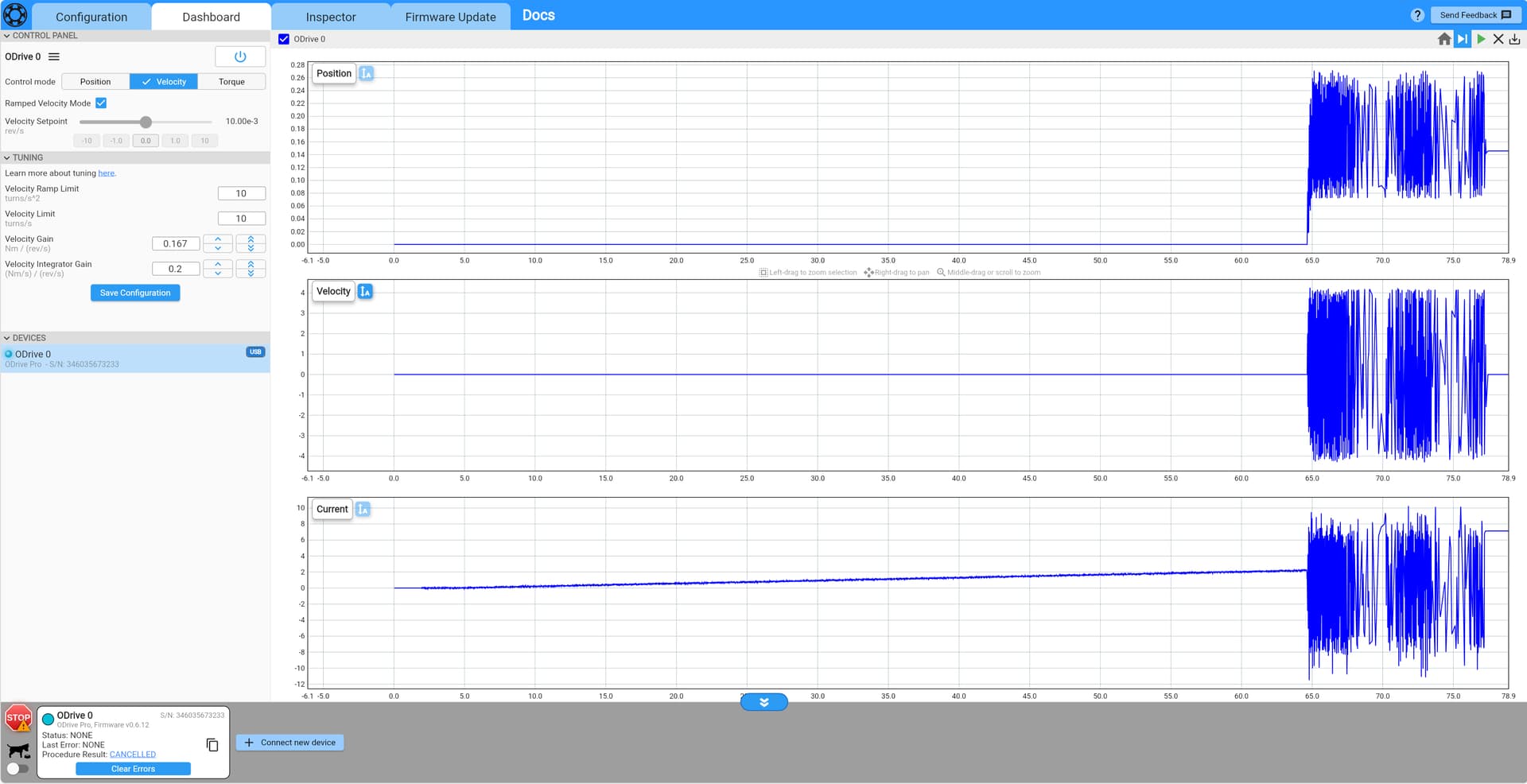
Good news, between changing the pole pairs to 4, and disconnecting the motor I got it spinning after the calibration. However the motion is incredibly janky, even at 0.01 velocity setpoint (see image):

I’ve tried tuning as you’ve advised, but even the lowest integrator gains cause the motor to spin erratically after a current ramp. The integrator just makes the current ramping much slower.

Have a good weekend.

Thank you for the offer, I don’t have the order number as this task was passed down to me. Some other competent engineer was supposed to attend this task, but I wanted to give it a shot myself.

Learning is great!

I can also look up the order from an email, address, etc – my email is solomon.greenberg@odriverobotics.com, if you want to send anything there.

No I do not use an USB isolator as that was not part of the controller purchase.

I’d strongly recommend grabbing one – they’re recommended/required for when both USB and DC power are connected simultaneously, to prevent possible damage caused by inadvertent ground loops.

Good news, between changing the pole pairs to 4, and disconnecting the motor I got it spinning after the calibration. However the motion is incredibly janky, even at 0.01 velocity setpoint (see image):

Great to hear it’s working! I definitely have some ideas for how to improve this.

At a baseline, I’d start with integrator gain at zero, and velocity gain at some much smaller number (maybe 0.01). Step velocity setpoints up to 10, and back to zero, each time increasing the velocity gain until you get vibration like you have there. At that point, set the velocity gain in half. Then, do the same thing with the integrator gain, keeping the velocity gain you just found.

I’ve exported the odrive_config, but it is 354 lines and the website does not allow .json upload.

Hmm, that json file will be very useful for diagnostics. Could you upload it somewhere else (e.g. pastebin, google drive) and link, or just email it to me?