Odrive UART communication failure[Fixed But ...]

Hello ODrive Community,

I have been struggling for a long time with a persistent “UART communication failure” on my oDrive v3.6 board running firmware version 0.5.6. The issue would occur intermittently, and the only temporary solution was to perform a hard reset of the board.

After extensive troubleshooting, I decided to modify the firmware. The UART communication failures have completely disappeared since I implemented the change below.

Here is the code I modified in :

interface_uart.cpp :  
osThreadDef(uart_server_thread_def, uart_server_thread, osPriorityNormal, 0, stack_size_uart_thread / sizeof(StackType_t) /* the ascii protocol needs considerable stack space */);
Change to ->
osThreadDef(uart_server_thread_def, uart_server_thread, osPriorityRealtime, 0, stack_size_uart_thread / sizeof(StackType_t) /* the ascii protocol needs considerable stack space */);
............................................................
board.cpp :
std::array<Axis, AXIS_COUNT> axes{{
    {
        0, // axis_num
        1, // step_gpio_pin
        2, // dir_gpio_pin
        (osPriority)(osPriorityHigh + (osPriority)1), // thread_priority
        encoders[0], // encoder
        sensorless_estimators[0], // sensorless_estimator
        controllers[0], // controller
        motors[0], // motor
        trap[0], // trap
        endstops[0], endstops[1], // min_endstop, max_endstop
        mechanical_brakes[0], // mechanical brake
    },
    {
        1, // axis_num
#if HW_VERSION_MAJOR == 3 && HW_VERSION_MINOR >= 5
        7, // step_gpio_pin
        8, // dir_gpio_pin
#else
        3, // step_gpio_pin
        4, // dir_gpio_pin
#endif
        osPriorityHigh, // thread_priority
        encoders[1], // encoder
        sensorless_estimators[1], // sensorless_estimator
        controllers[1], // controller
        motors[1], // motor
        trap[1], // trap
        endstops[2], endstops[3], // min_endstop, max_endstop
        mechanical_brakes[1], // mechanical brake
    },
}};
Change to ->
std::array<Axis, AXIS_COUNT> axes{{
    {
        0, // axis_num
        1, // step_gpio_pin
        2, // dir_gpio_pin
        osPriorityHigh, // thread_priority
        encoders[0], // encoder
        sensorless_estimators[0], // sensorless_estimator
        controllers[0], // controller
        motors[0], // motor
        trap[0], // trap
        endstops[0], endstops[1], // min_endstop, max_endstop
        mechanical_brakes[0], // mechanical brake
    },
    {
        1, // axis_num
#if HW_VERSION_MAJOR == 3 && HW_VERSION_MINOR >= 5
        7, // step_gpio_pin
        8, // dir_gpio_pin
#else
        3, // step_gpio_pin
        4, // dir_gpio_pin
#endif
        osPriorityHigh, // thread_priority
        encoders[1], // encoder
        sensorless_estimators[1], // sensorless_estimator
        controllers[1], // controller
        motors[1], // motor
        trap[1], // trap
        endstops[2], endstops[3], // min_endstop, max_endstop
        mechanical_brakes[1], // mechanical brake
    },
}};

This change has proven to be a stable fix for the communication issue. However, I am not entirely certain about the potential side effects.

My question for the experts here is: **Could this modification negatively impact the motor’s performance or behavior in any way?
Hi!

Yes, I think this could have some side effects regarding motor performance, however it’s very difficult to tell.

What’s the actual symptom of the UART/communications failure? Is it dropped messages? Or just a longer reply time? I can only see increasing the thread priority as helping with faster response time / higher incoming message processing bandwidth. But UART is frankly not a good choice if you need fast communication, that’s what CAN is for.

Thank you for your replies. Let me provide some more specific details about my setup and the failure mode, which might help with the analysis.

My Communication Workflow:

My standard process for communicating with the oDrive is as follows:

  1. ​I send a command to the oDrive.
  2. ​I wait for a fixed 30 ms delay.
  3. ​I then read the response data back from the oDrive for use in my application.

Specifics of the “UART Communication Failure”:

To be more precise, the failure isn’t data corruption; it’s that the oDrive’s response (TX) line completely stops sending any data.

​What’s very strange is that the communication still works perfectly in one direction (from my controller to the oDrive). For example, even after the failure has occurred:

  • ​If I send a command to request AXIS_STATE_CLOSED_LOOP_CONTROL (state 8), the motor engages correctly.
  • ​If I send a command to request AXIS_STATE_IDLE (state 1), the motor disengages as expected.

​However, any command that requires the oDrive to send data back (like requesting the current state or other feedback) receives no response at all.

​This one-way communication failure is the exact state that I could only recover from with a hard reset, prior to oDrive firmware modification.

​I hope this additional information provides more clarity. Thank you again for your help!

The axes array is initialised with the following thread priorities:
Axis 0: osPriorityHigh + 1 (which is likely osPriorityRealtime)
Axis 1: osPriorityHigh
UART thread: osPriorityNormal

In my opinion, sometimes the two high-priority motor control threads are consuming all the CPU time, preventing the normal-priority UART thread from ever running. When the UART thread can’t run, it can’t process transmit-complete events, and the entire communication pipeline stalls.

Hello. I am experiencing the exact same issues.

I have a 56v Flipsky odesc 4.2 (odrive 3.6 clone) with 0.5.6fw version. It completely stops sending data to arduino after 5-20 seconds of active polling, no matter the frequency (10-500hz).

I have tried different arduino/esp32 boards on different baud rates, different firmware versions (both official and unofficial) and trying to make my configs from scratch like 4 times.
I even wrote a custom arduino library to replace official ODriveArduino.

I am very tired and frustrated and i want to complete my project. What options do i have?

Unfortunately they run some weird hacked up ODrive firmware on those, which we can’t support. I’d recommend reaching out to the manufacturer for support. Alternatively, you may want to get a logic analyzer or ST-Link debugger and jump in yourself, but that’ll take some work.

Thank you for the reply. Yes, i am informed that flipsky uses some obscure modified firmware versions on those, but the issue is persistent across all of firmware versions i’ve tried, both flipsky provided and downloaded from odrive cdn,

Also somehow the bootloader is also screwed up on my board so i was using ST-Link instead of recommended DFU mode. But the issue is unrelated to that.

I am saying that TX line stops any communication because i’ve seen it with an oscilloscope. I do have a logic analyzer, and if you want i can make a setup and send you packet captures.

Edit: pulseview packet captures are available at https://zamonary1.ru/static/pw-odesc-uart-fault-filter (sorry, discourse doesn’t allow .zip attachments for new accounts.)
Edit2: packet captures were made with esp32-c3 connected via UART. Unfortunately right now i have an unofficial flipsky firmware, but as i said earlier the issue is exactly the same.

Hm, it might be some weird hardware issue. Unfortunately I think only the manufacturer can really help with this one, unless you want to try doing some actual debugging with the ST-Link. Those cheap clones are almost never worth the time, in my experience.

By the way, i tried compiling the firmware on 2 separate systems (running arch and alpine) and they both fail with the same error. Is there any way i can fix that?

 ~/ODrive    Firmware  make                         Пт 09 янв 2026 21:08:17
board version: v3.6-56V
Firmware version 0.5.6-dev (fw-v0.5.6-4-gf9b5419c)
* 102) python -B interface_generator_stub.py --definitions odrive-interface.yaml --template fibre-cpp/function_stubs_template.j2 --output autogen/function_stubs.hpp
/home/zamonary1/ODrive/tools/fibre-tools/interface_generator.py:489: SyntaxWarning: invalid escape sequence '\.'
  property_value_type = re.findall('^fibre\.Property<([^>]*), (readonly|readwrite)>$', prop['type'].fullname)
Traceback (most recent call last):
  File "/home/zamonary1/ODrive/Firmware/interface_generator_stub.py", line 8, in <module>
  File "/home/zamonary1/ODrive/tools/fibre-tools/interface_generator.py", line 588, in <module>
    raise Exception(err.message + '\nat ' + str(list(err.absolute_path)))
Exception: None is not of type 'object'
at []
 *** tup messages ***
 *** Command ID=402 failed with return value 1
* 101) python -B interface_generator_stub.py --definitions odrive-interface.yaml --template fibre-cpp/type_info_template.j2 --output autogen/type_info.hpp
/home/zamonary1/ODrive/tools/fibre-tools/interface_generator.py:489: SyntaxWarning: invalid escape sequence '\.'
  property_value_type = re.findall('^fibre\.Property<([^>]*), (readonly|readwrite)>$', prop['type'].fullname)
Traceback (most recent call last):
  File "/home/zamonary1/ODrive/Firmware/interface_generator_stub.py", line 8, in <module>
  File "/home/zamonary1/ODrive/tools/fibre-tools/interface_generator.py", line 588, in <module>
    raise Exception(err.message + '\nat ' + str(list(err.absolute_path)))
Exception: None is not of type 'object'
at []
 *** tup messages ***
 *** Command ID=406 failed with return value 1
* 100) python -B interface_generator_stub.py --definitions odrive-interface.yaml --template fibre-cpp/interfaces_template.j2 --output autogen/interfaces.hpp
/home/zamonary1/ODrive/tools/fibre-tools/interface_generator.py:489: SyntaxWarning: invalid escape sequence '\.'
  property_value_type = re.findall('^fibre\.Property<([^>]*), (readonly|readwrite)>$', prop['type'].fullname)
Traceback (most recent call last):
  File "/home/zamonary1/ODrive/Firmware/interface_generator_stub.py", line 8, in <module>
  File "/home/zamonary1/ODrive/tools/fibre-tools/interface_generator.py", line 588, in <module>
    raise Exception(err.message + '\nat ' + str(list(err.absolute_path)))
Exception: None is not of type 'object'
at []
 *** tup messages ***
 *** Command ID=400 failed with return value 1
*  99) python -B interface_generator_stub.py --definitions odrive-interface.yaml --generate-endpoints ODrive3 --template fibre-cpp/endpoints_template.j2 --output autogen/endpoints.hpp
/home/zamonary1/ODrive/tools/fibre-tools/interface_generator.py:489: SyntaxWarning: invalid escape sequence '\.'
  property_value_type = re.findall('^fibre\.Property<([^>]*), (readonly|readwrite)>$', prop['type'].fullname)
Traceback (most recent call last):
  File "/home/zamonary1/ODrive/Firmware/interface_generator_stub.py", line 8, in <module>
  File "/home/zamonary1/ODrive/tools/fibre-tools/interface_generator.py", line 588, in <module>
    raise Exception(err.message + '\nat ' + str(list(err.absolute_path)))
Exception: None is not of type 'object'
at []
 *** tup messages ***
 *** Command ID=404 failed with return value 1
 [                   ETA~=8s  Remaining=99  Active=0                    ]   3%
 *** tup: 4 jobs failed.
make: *** [Makefile:33: all] Error 1

@Surasak_Sudaiam i have created a new fork of ODrive firmware, with your fixes included. You can take a look.
Also, there is a firmware release with you patches applied.
Don’t worry, i did all the proper attribution. If you want you can open a PR to add link to your socials.

Real Root Cause Found: UART Server Starts Before Motor Hardware Init

Hi everyone,

I’ve been dealing with the same intermittent UART timeout issue on a Flipsky ODESC 3.6 56V (ODrive 3.6 clone) running FW 0.5.6. After systematic analysis I found the real root cause — and it’s different from the priority-based fixes discussed in this thread.

Symptom:

  • 34–89% UART timeouts on Native Fibre protocol
  • Timeouts were non-deterministic
  • get_drv_fault() returned 0 even when DRV_FAULT was reported

Why previous fixes helped but didn’t fully solve it: The priority changes by Surasak_Sudaiam and zamonary1 reduced the problem by giving the UART thread more CPU time — but they didn’t address the underlying race condition. Some of those fixes also inadvertently changed axis thread priorities which caused DRV_FAULT during calibration.

The real root cause: start_uart_server() is called inside init_communication() — which runs before motor_.setup() (DRV8301 gate driver init) and before start_adc_pwm(). The UART thread is already running and competing for resources while the gate driver is still initializing. The result is non-deterministic UART timeouts that correlate with motor hardware state.

The fix: Move start_uart_server() out of init_communication() and call it after the motors_ready wait loop in main.cpp. This ensures the UART thread only starts once the motor hardware is fully initialized.

Two files changed:

Firmware/communication/communication.cpp — remove the start_uart_server() calls from init_communication():

cpp

// REMOVE:
if (odrv.config_.enable_uart_a && uart_a) {
    start_uart_server(uart_a);
} else if (odrv.config_.enable_uart_b && uart_b) {
    start_uart_server(uart_b);
}

Firmware/MotorControl/main.cpp — add after the motors_ready wait loop, before axes[i].start_thread():

cpp

// Start UART after motors are ready — avoids SPI bus conflicts
// during DRV8301 gate driver initialization
if (odrv.config_.enable_uart_a && uart_a) {
    start_uart_server(uart_a);
} else if (odrv.config_.enable_uart_b && uart_b) {
    start_uart_server(uart_b);
}

No priority changes needed. Original thread priorities remain unchanged.

Test results (100 reads, Native Fibre protocol):

  • Before fix: 11–66 successful / 100
  • After fix: 100/100, 0 timeouts

Hardware: Flipsky ODESC 3.6 56V, FW 0.5.6

Pre-built binary + source:Release FW 0.5.6 UART Startup Sequence Fix (Flipsky ODESC 3.6 56V) · adaefler-art/ODrive · GitHub

Hope this helps others with the same issue.

1 Like

@zamonary1 @Surasak_Sudaiam have a look at my recent post, it might solve your problems

1 Like

Looks promising, i am gonna assemble my old failed project just to test your patches. Wish me luck!

1 Like

Unfortunately it didn’t work out for me. I’ve used your precompiled binaries and the problem is the same - sudden UART connectivity loss.

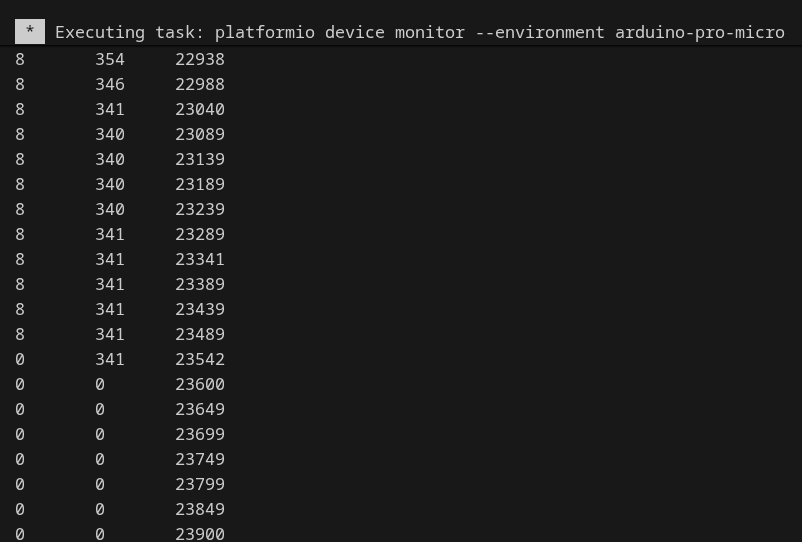
below is the profiler from my project, from left to right:
ODrive state, encoder shadow counts, arduino millis()

Hi Viktor,
thanks for testing and sharing the profiler output — that’s very helpful.
Looking at your log, the pattern is clear: state drops from 8 → 0 at millis ~23542, encoder counts go to zero immediately after. This is not a pure UART-init issue (which my fix addresses) — this looks like the ODrive is hitting an error/exception that resets the axis state, and UART then becomes unresponsive as a consequence.
A few things to check:
1. Which exact hardware are you running? My fix targets the ODESC 3.6 (ODrive 3.6 clone) with FW 0.5.6. If you’re on original ODrive v3 hardware, the binary won’t match.
2. What triggers the state drop? Can you add odrv0.axis0.error and odrv0.axis1.error to your profiler output? The error code at the moment of the drop will tell us exactly what kills the axis.
3. Arduino Pro Micro uses software UART — at higher baud rates this can introduce framing errors that corrupt commands and trigger an axis fault. Try dropping to 19200 baud and see if the drop still occurs.
4. Is this under load or at idle? If it only happens when motors are spinning, it’s likely an encoder or overcurrent fault, not a UART bug.
Once we have the error code at the moment of the drop, we can tell for sure what’s happening.